
Collect emails from your link-in-bio page
dxd.link has a built-in email capture block. Visitors enter their address and agree to be contacted, the signup lands in Captures in your dashboard, and you can export the list to CSV on every plan. Creator adds sync to Mailchimp, Klaviyo, or Beehiiv.
How it works
- 01Add an EMAIL block in the editor.
- 02Write the prompt, placeholder, button label, and confirmation message.
- 03Publish your page.
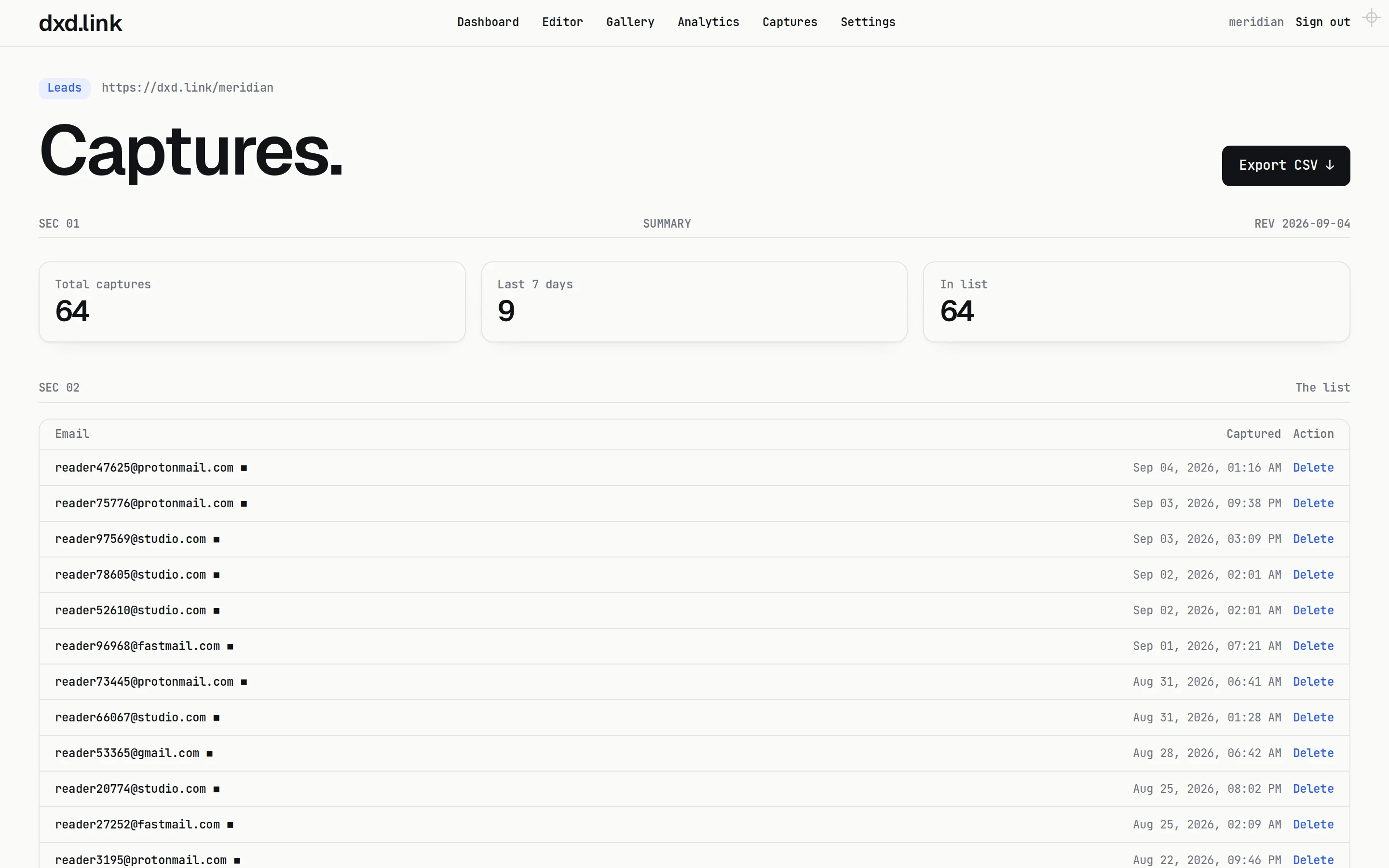
- 04Open Captures to see signups, and select Export CSV whenever you need the list.
Consent built in
The form includes a consent line telling visitors you may contact them and that dxd.link stores their address for you, with links to the terms and privacy policy.
Your list, exportable
Captures shows totals, the last seven days, and each address with its time. Export a CSV with email and timestamp at any time, or delete an entry.
Send it to your tools
On Creator, sync captures to Mailchimp, Klaviyo, or Beehiiv, or send each signup to a webhook so your own tools hear about it right away.
Which plan
The EMAIL block, Captures, and CSV export are free. Email list sync, capture webhooks, and ad pixels are on Creator ($4.99 a month) and Founding.
Questions
Is email capture free?
Yes. The EMAIL block, the Captures list, and CSV export are on every plan, including Free.
Can signups go straight to Mailchimp?
On Creator and Founding, captures can sync to Mailchimp, Klaviyo, or Beehiiv. On Free, export a CSV and import it.
Do visitors agree to be contacted?
Yes. The form asks visitors to confirm you may contact them at that address before it submits.
Can I customize the form text?
Yes. Set the prompt, placeholder, button label, and confirmation message. The form follows your page's skin and accent.
Can I have more than one signup form?
Yes. Add more than one EMAIL block, for example at the top and bottom of a long page. Their signups collect in the same Captures list.
- WritersYour latest posts from RSS, a newsletter signup, and your books on one quiet page. Free to publish at dxd.link/yourname.
- PodcastersLatest episodes from your RSS feed, listen links for every app, and a newsletter signup on one page. Free to publish.
- CoachesA booking button, upcoming workshops, your programs, and an email list on one page. Free to publish at dxd.link/yourname.
- MusiciansOne page for the new record, tour dates, merch, and your mailing list. Free to publish, with live Spotify now-playing on Creator.