
A link-in-bio page for musicians
dxd.link gives musicians one page for the new release, upcoming shows, merch, and a mailing list, arranged on a grid instead of a long button list. Free publishes at dxd.link/yourname with every block and skin. Creator adds live Spotify now-playing and scheduled links for onsales.
Blocks that matter
- MUSICPlaylist / TrackLive on Creator
Feature a track, album, or playlist with a direct listen link. Turn on live mode and connect Spotify to show what you are playing right now, and your last track when you are not.
- LINKHyperlink Button
Spotlight one link as a full-width call to action above the grid, such as tickets or the pre-save. Use pill links for every platform you release on.
- CALENDARUpcoming Events
Point it at a public .ics calendar and your next dates list themselves. Update the calendar and the page follows.
- PRODUCTBuy Card
A card for a record or a shirt, with a price, up to eight photos, and a button to the shop you already use. Checkout stays there.
- EMAILLead Capture
Collect addresses for presale codes and dates before they go public. Captures land in your dashboard and export to CSV.
- VIDEOEmbed / Mp4
Embed a YouTube or Vimeo video for the new single or a live session.
An example layout
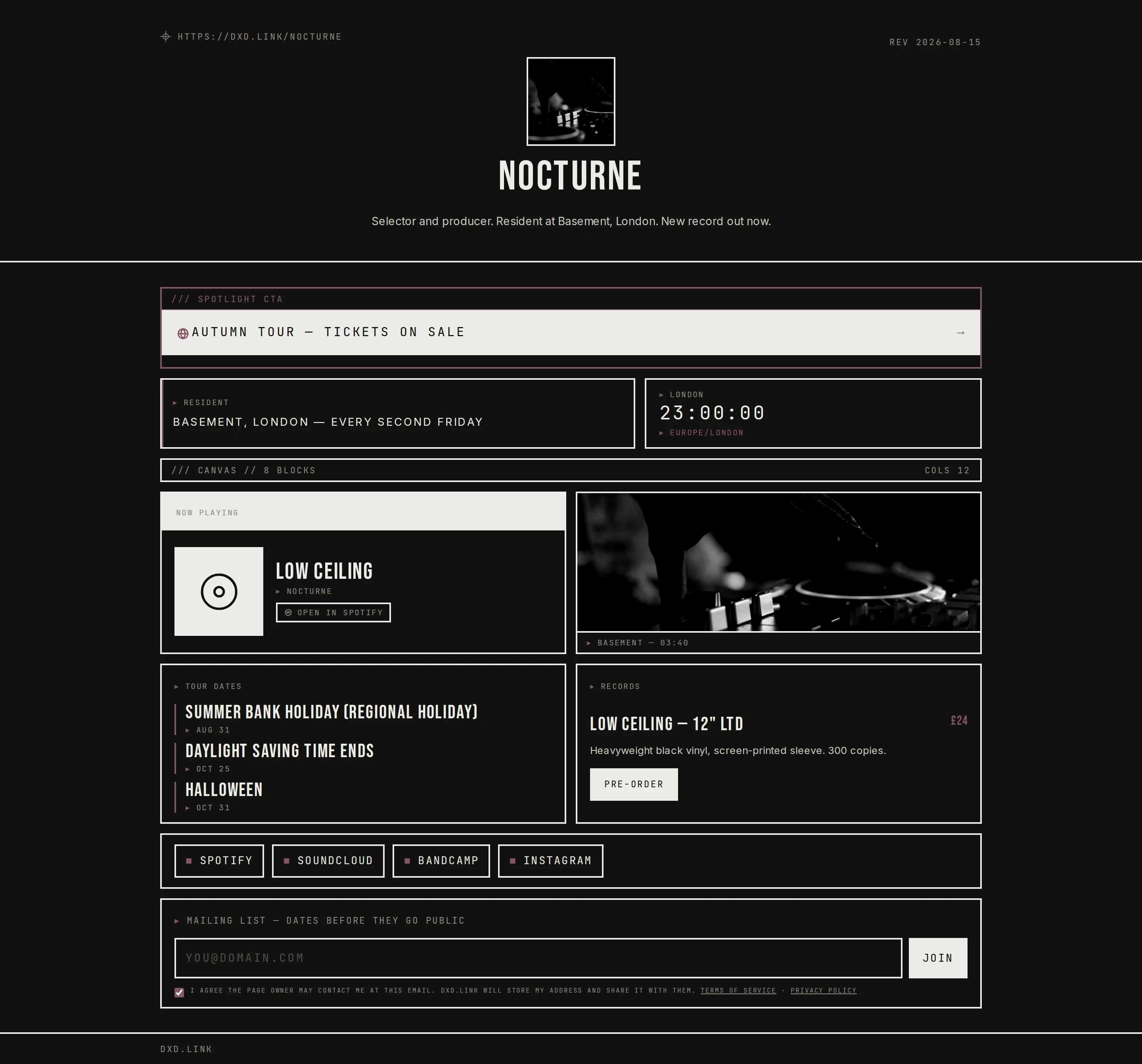
Spotlight the tickets link across the top. Below it, put a MUSIC block beside a press photo, then a CALENDAR block with the next shows beside a PRODUCT card for the vinyl. Finish with a SOCIAL row for streaming platforms and an EMAIL block for the list.
Free and Creator
One page with every block, every skin, and accent presets. MUSIC blocks link to any track or playlist. Email captures and basic views and clicks are included.
Live Spotify now-playing, scheduled links for presales and onsales, extra tabs for Tour or Shop, full analytics, and no dxd.link badge. $4.99 a month.
Questions
Can my page show what I am listening to on Spotify?
Yes, on Creator or Founding. Connect Spotify in Settings, then turn on live mode in a MUSIC block. It shows your current track while you listen and your most recent track when you are not. On Free, a MUSIC block links to any track, album, or playlist you choose.
Does dxd.link embed a Spotify player?
No. The MUSIC block shows the title and artist, then links out to Spotify or wherever the music lives. No player scripts load on your page, which keeps it fast.
How do I show tour dates?
Add a CALENDAR block and paste a public .ics feed URL, for example from Google Calendar or a booking tool that exports one. Upcoming events render on the page and update when the calendar changes.
Can I sell merch from my page?
A PRODUCT card shows the item, price, and photos, and its button opens your existing store, such as Bandcamp or Shopify. dxd.link does not take payments, so you keep your shop and its checkout.
Can a ticket link appear only during the onsale?
Yes, on Creator. Schedule any block with a go-live and hide-at time in your page timezone, plus optional text for before and after. The 4h, 24h, and 48h presets cover common drop windows.
- Spotify now playingConnect Spotify and a MUSIC block shows the track you are playing right now, or your last track when you are not. On Creator and Founding.
- Scheduled linksSet a go-live and hide-at time on any block, with before and after text. Drop presets for 4, 24, and 48 hours. On Creator and Founding.
- Email captureAdd an EMAIL block, collect signups with consent, and export them to CSV on every plan. Sync to Mailchimp, Klaviyo, or Beehiiv on Creator.
- A personal page for musicians and artistsOne link for releases, shows, merch, listen links, and visuals. Arrange blocks, publish from draft, schedule drops when you need them.
- Schedule links for drops without babysitting your bioCreator scheduling shows or hides blocks on a clock for merch drops, ticket onsales, and limited campaigns.